
How Much Work Can You Hand an AI Assistant?
- #artificial-intelligence
- ·#productivity

TL;DR
How much you can hand an AI agent depends on the task, and has little to do with how smart the model is. Ask two questions of any job. How easy is the result to check? How cheap is a mistake to undo? The answers put the job on a scale from Level 0, where an AI assistant helps and you drive, to Level 3, where the automation runs on its own. When you're unsure between two levels, pick the lower one.
It depends on the task
Picture asking your AI assistant to rename this week's meeting recordings to a fixed pattern. Then picture asking it to reply to a client who is angry about a late deliverable. You'd treat those jobs differently, whatever model you're using.
Most AI assistants can now work as AI agents too. They file, send, and book on your behalf, which is when the question of how much to hand off starts to matter.
Jina Yoon argues exactly this in "How much can you delegate to agents?", published in PostHog's newsletter on July 27, 2026. She writes that trusting agents because the models got smarter is "like skipping your seatbelt because you got a nicer car." Her examples come from software engineering, but the idea travels well to an owner's week.
I think the framing is more useful than most of what gets written about AI agents, because it gives you something to do on Monday. You don't need to know which model is best. You need to know your own work.
Questions to frame your approach
The first question is whether the agent's work is easy to check. Can you tell the result is right without redoing the job? A total that matches your timesheet passes or fails in seconds. A judgment call needs your taste, and that takes as long as doing it.
The second is whether a mistake is cheap to undo. Picture the worst case going out. A misfiled document costs you a minute. An invoice already sitting in a client's inbox costs you an awkward call.
Put the two answers on a grid and each corner gets a level.
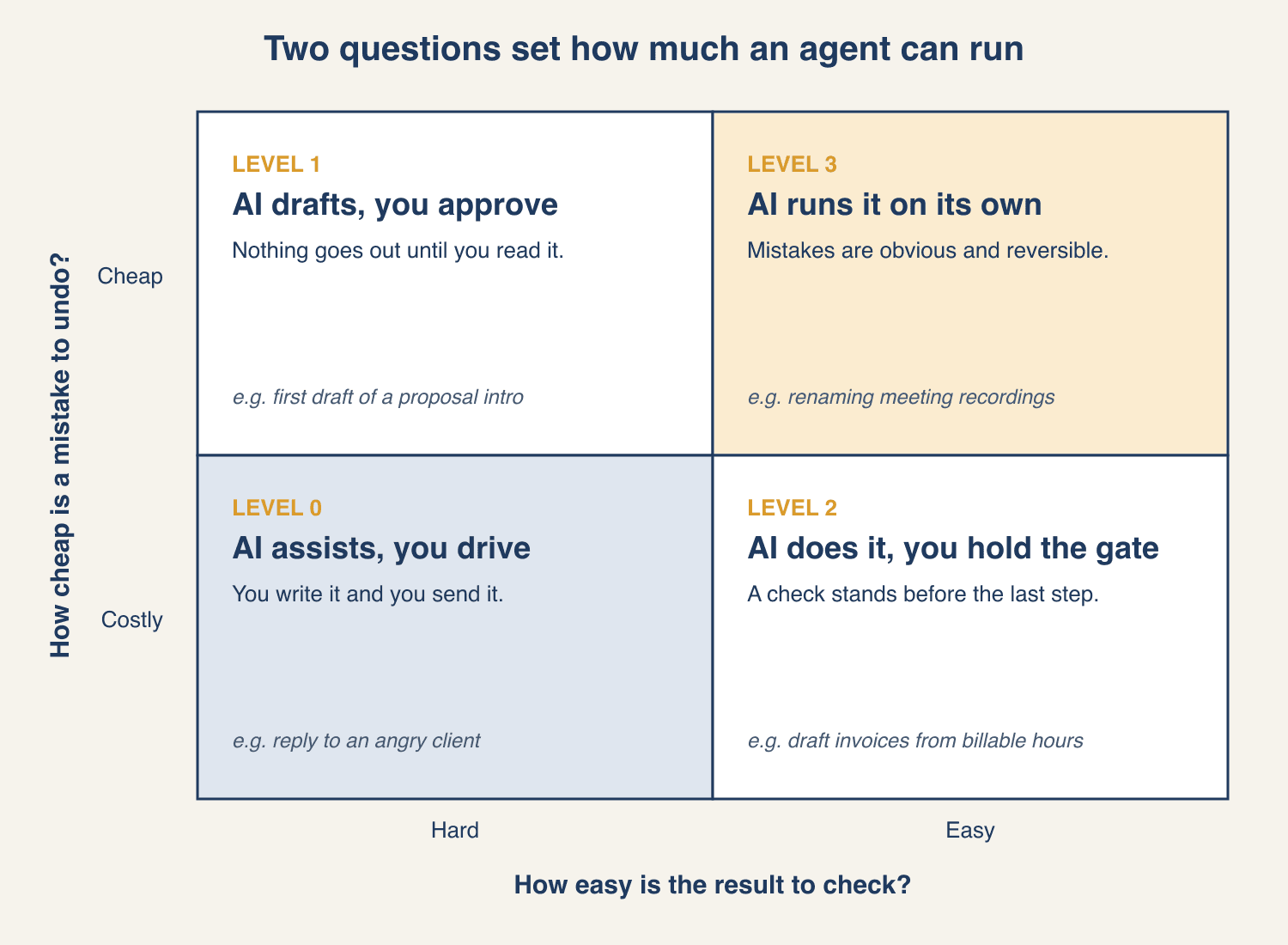
Four levels of AI collaboration
Level 0: AI assists, you drive
Hard to check and hard to undo. This is the AI assistant most people already use, the one you ask for advice. It can suggest a tone or point out what you missed, but you write the reply to that angry client and you press send.
Level 1: AI drafts, you approve
Hard to check and easy to undo. The work needs a subjective call, so nothing goes anywhere until you sign off. A first draft of a proposal intro fits here. A bad draft costs you one more pass, as long as nothing goes out before you've read it.
Level 2: AI does it, you hold the gate
Easy to check and hard to undo. The agent does the work, and a final check stands between it and the step you can't take back. Pulling billable hours into draft invoices fits. You can check the totals against your timesheet in a few minutes, but you can't quietly recall an invoice a client has already opened.
Level 3: AI runs it on its own
Easy to check and easy to undo. Fewer tasks qualify than you'd hope. Renaming recordings to a fixed pattern fits. A wrong name is obvious and you can change it back in seconds. This is the corner where automation can run without you watching.
Validate against a realistic week
Here is the exercise done on a few common owner tasks, so you can see the reasoning behind each call. Yours may land differently depending on your tools and clients.
| Level | Task | Easy to check? | Cheap to undo? | To move it up |
|---|---|---|---|---|
| 0 | Saying no to a scope change | No | No | Use the assistant for talking points only |
| 1 | Rewriting your services page | No, it's a matter of taste | Yes, until you publish | Give it two or three pages you like as the standard |
| 2 | Weekly status email to a client | Mostly, if it reads your project board | No, once it's sent | Have the agent save a draft you send |
| 2 | Booking meetings from inbound requests | Yes, the calendar shows it | Partly, a reschedule costs goodwill | Limit it to open slots you've marked |
| 3 | Sorting receipts into bookkeeping categories | Yes, a quick scan of the list | Yes, before the books close | Already there. Spot-check once a month. |
Doing this for your own week is harder than it looks, because you're too close to it. Most owners can't say how they'd check half the things they do. That's what the free AI Opportunity Audit is for. You tell me how your week actually runs, and your Snapshot comes back with what's worth handing to AI now, what can wait, and what to leave alone.
Moving a task up a level
A task's level isn't fixed. You can rework the job so it earns more autonomy, and the right move depends on where it starts.
At Level 0, break the job into pieces and hand off the safe ones. The reply to the angry client stays yours, but pulling the project timeline and the original deadline into a summary for you to read is a Level 3 job.
At Level 2, build guardrails into the process itself, such as drafts by default and logins with limited permissions. For the invoice run, that means the agent's login can create drafts but has no permission to send.
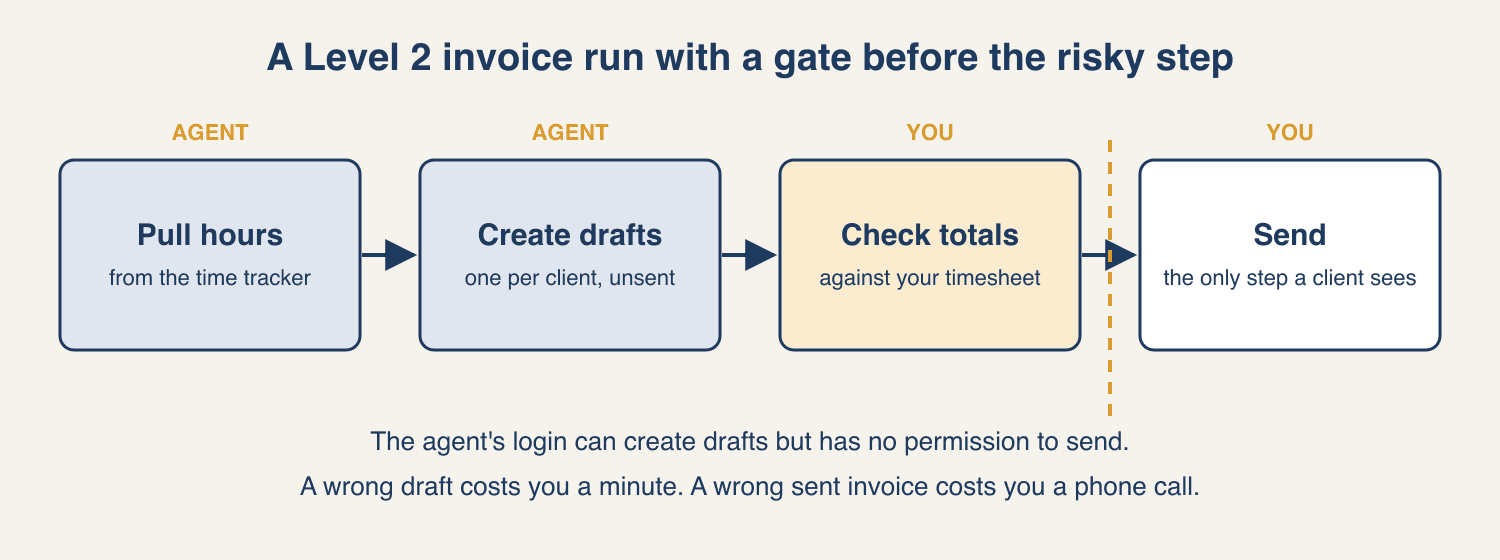
The permission does the real work here. An agent can misread or skip an instruction like "don't send anything." It can't use a send button its login doesn't have.
What this doesn't tell you
Model quality still matters. A better model can move some tasks up a level, for example when a second AI can reliably check subjective work. A smarter model, on its own, is still not the reason to hand something off.
The scale is easiest to apply where checking is automatic, as with code. In an owner's week, checking usually means your own eyes, and your eyes have a limited budget. A Level 2 task that takes 20 minutes to check every day may not be worth automating at all.
This is also the question I'd want any AI consulting conversation to start with. If a recommendation skips how you'll check the output and what happens when it's wrong, you're hearing a tool pitch.
Takeaway
The scale gives you a way to decide how far to trust an agent without waiting for a better model. It works on anything you do more than once. When you're unsure between two levels, pick the lower one.
This week, write down three tasks you do. For each, answer the two questions: easy or hard to check, cheap or costly to undo. Then find the level, and for anything at Level 2, name the one step a person has to approve. If you can't say how you'd check a task, treat it as Level 0 or 1 until you can. If no task comes to mind, start with the one that annoys you most.
If you'd rather have a second reader place your tasks, start the free AI Opportunity Audit. It's a short form about how your week runs. I read it and write your Snapshot, a straight read on where AI is worth it and where it isn't. I'll tell you if AI won't help.
👋 Good read?
Subscribe for more insights on AI, data, and software.